Estate Executor Organizer
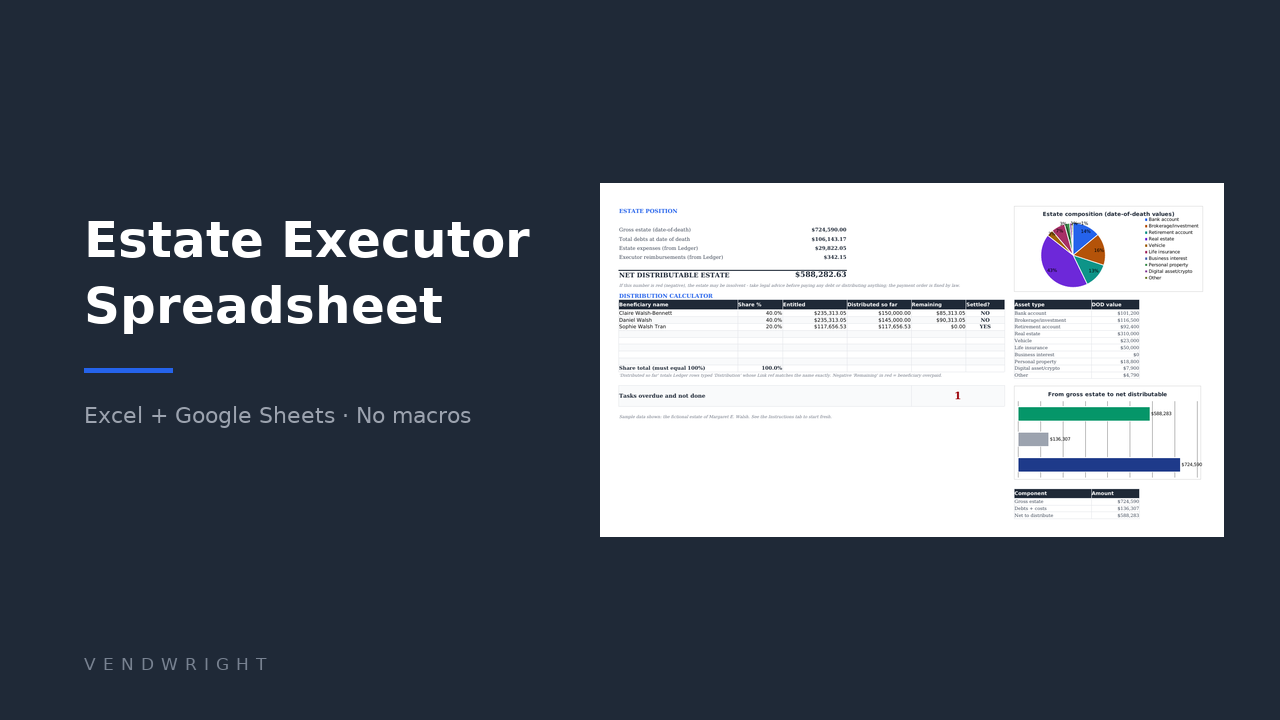
An executor keeps several things straight at once: what the estate owns, what it owes, what moves through the estate account, who gets what, and what every institution told you on the phone. This is one workbook for all of it. Log a payment once and it lands everywhere it should.
It works in any country and in any currency. There is no jurisdiction edition of this file and there is not going to be one: it prints no deadline, no notice period and no threshold of its own, and the currency is a dropdown of eleven codes on the Instructions tab, or your own symbol typed in.
- Date-of-death asset inventory, tracked from To locate to Distributed
- Estate ledger with a running balance and missing-receipt flags
- Distributions tab keeping specific gifts and residue percentages apart
- Communications log with follow-up countdowns, and a register of where the originals are kept
- 40 prefilled probate tasks, plus 34 local-rules questions with every answer left to you
It also works in reverse. Fill in the inventory and the contacts now, and your own executor gets a map instead of a mystery.
€12 one-off
One .xlsx file. Not on sale yet. Instant download after payment once checkout opens. No subscription, no account to keep.
Checkout opens shortlyEmail support@vendwright.com to be told when this template goes on sale.An organisational tool, not legal advice
Probate rules differ by country and, in the US, by state. This workbook records and adds up what you tell it. It does not know what the law where you are requires, so confirm every deadline and the order debts are paid in with the court, registry or lawyer handling the estate.
What it does
Being an executor is a part-time job nobody trained you for. Find every account. Value it all as at the date of death. Pay the right debts in the right order, keep records a court will accept, then show the family the split was fair. Most people do it in a folder of statements and a notes app, and spend a fortnight at the end reconstructing what happened.
Here every strand sits in one file and they talk to each other. Log a payment in the ledger against a debt number and the debts register updates itself, so you never type an amount twice. Put the beneficiary shares on the Distributions tab and you get entitled, paid and remaining side by side, which is the table that ends arguments before they start. The running balance turns the final accounting into a print job rather than a panic, and the calls you made are written down while you still remember the reference number.
It does not calculate inheritance or estate tax, file anything, or know the rules where you are. What it gives your accountant or solicitor is tidy numbers instead of a shoebox.
Who it is for
Executors and administrators in the middle of it, who need one place for the money and one list of what is next. Especially anyone who will have to hand the court or the beneficiaries a written account at the end.
People organising their own affairs, who want to leave a map: which bank, which policy, which drawer, who to ring. Fill in the inventory and the contacts, leave the probate columns blank, and look at it once a year.
It suits an estate that fits on a few dozen rows: a house, some accounts, a car, personal property, a handful of debts. A contested estate, a trading business or assets in three countries needs professional help. The workbook is still a useful record; it will not be the whole answer.
Free tool first
Not sure you need a spreadsheet yet? The executor checklist generator builds a printable probate task list with typical target dates from five answers. Free, no email address, useful on its own.
Your data stays yours
It is a file on your computer. No account, no sync, nothing phoning home. The Instructions tab shows you how to password-protect it, because an estate file is exactly the kind of document that should not be sitting unencrypted in an inbox.
What is inside, tab by tab
Fourteen tabs. Every figure on the dashboard comes from what you typed on the other thirteen.
1. Instructions
An eight-step quick start, how the tabs feed each other, the currency picker, and a plain-English glossary for the words you are suddenly expected to know: probate, letters testamentary, date-of-death value, residuary estate. Also the ranges to clear when you want the sample estate gone.
2. Asset Inventory
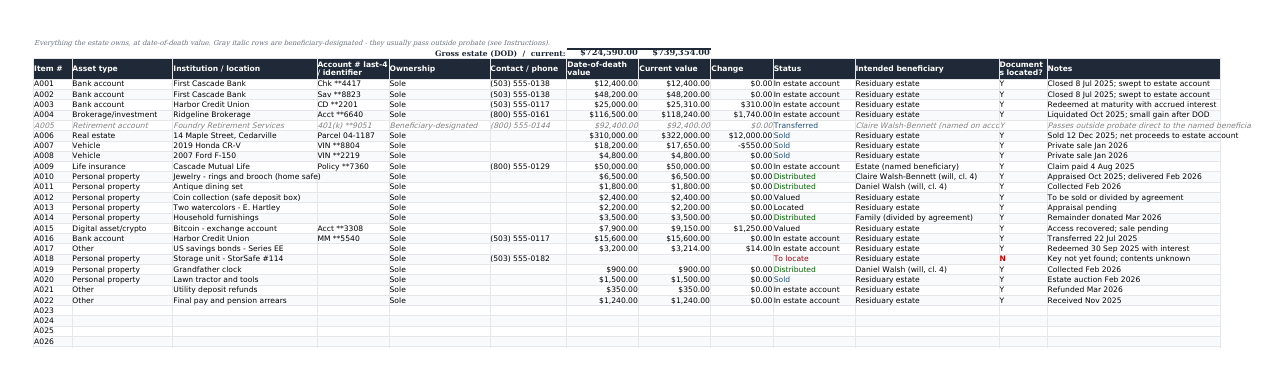
150 rows: what it is, where it is held, what it was worth at the date of death, what it is worth now, who it is going to, and whether you have found the paperwork yet. Assets with a named beneficiary sit in grey italics, because they usually pass outside probate and are not yours to distribute.
3. Property & Contents
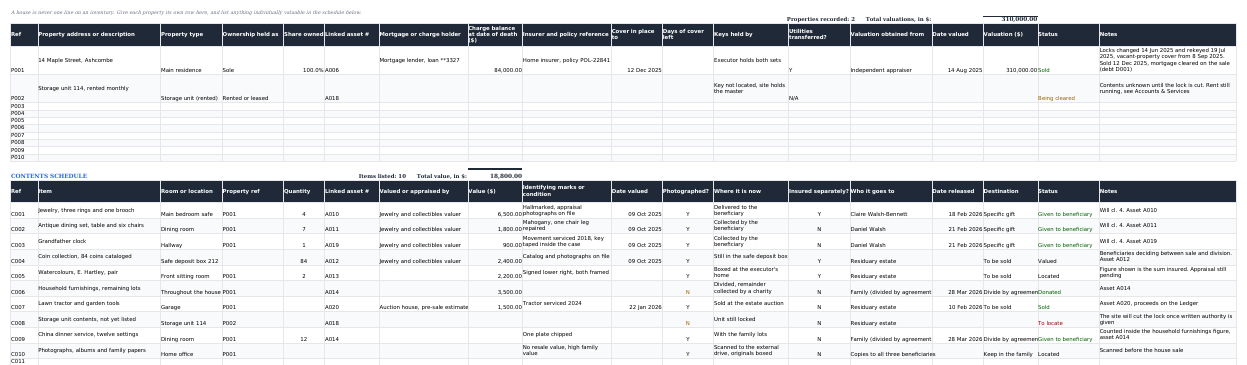
A house is never one line on an inventory. Ten rows for property and land, each with its own charge balance at the date of death, insurer, the date cover runs to with a countdown, who holds the keys and whether the utilities have moved across. Under it, a fifty-row contents schedule, room by room, with the valuer, the value, whether it has been photographed, where the item is now and who it goes to.
4. Debts & Claims
100 rows for creditors and claims. You never type what has been paid: the paid and outstanding columns read the ledger by debt number. Deadlines turn amber inside 14 days and red once they have passed.
5. Estate Ledger
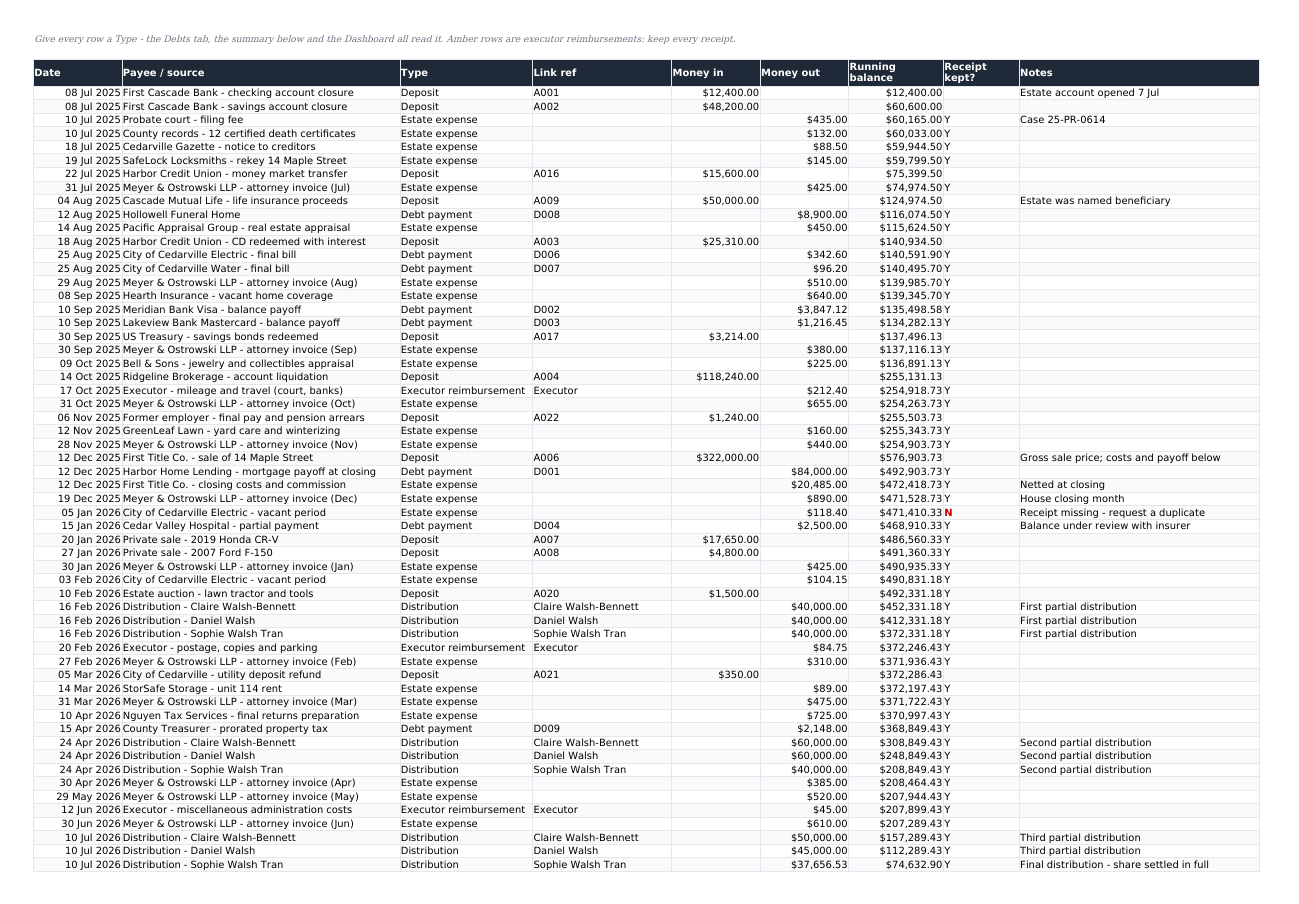
300 rows. The estate account's chequebook, with money in, money out and a running balance. Executor reimbursements highlight amber, because they are the first thing beneficiaries question. A missing receipt flags red.
6. Income & Expenses
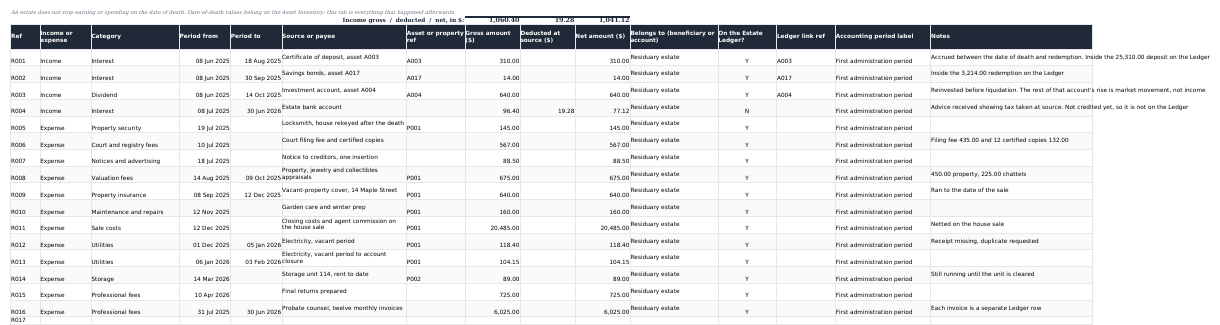
150 rows for what the estate earned and spent after the date of death, which is a different question from what it was worth on the day. Interest, dividends and rent on one side; court fees, creditor notices, valuations, vacant-property insurance, utilities, storage and professional fees on the other. Gross, tax taken at source and net stay in separate columns, and each row carries an accounting period label.
7. Executor Time & Expenses
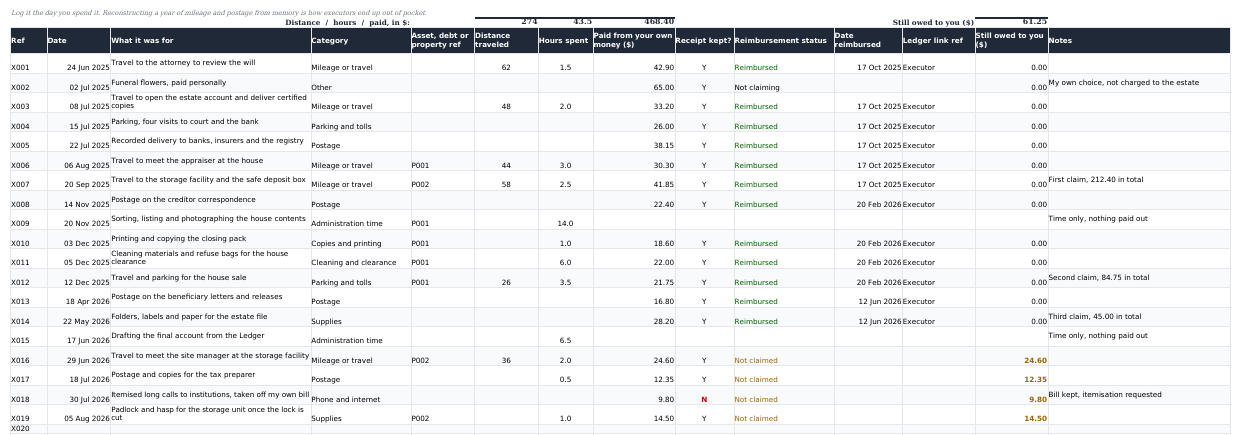
100 rows for the money that comes out of your own pocket and the hours that come out of your own week. Mileage, parking, postage, printing, cleaning, supplies. Mark a row reimbursed and it clears; leave it and the tab totals what the estate still owes you. Reconstructing a year of this from memory is how executors end up out of pocket.
8. Distributions
50 rows, with specific gifts and residue percentages on separate rows because they are different things. Entitled, paid to date and remaining are all formulas, paid to date reads the ledger, and a banner turns red until the residue percentages total 100%. A gift handed over rather than paid in cash is marked satisfied in kind.
9. Accounts & Services
100 rows for every utility, subscription, insurer, membership, mail redirection and online account: what needs doing, the date you did it, and any refund or final bill. It ships with no provider names at all, because the ones that matter are yours.
10. Where Things Are
A location register for the originals: the will, the deeds, the certificates, the safe, the safe deposit box, the password manager. Where each one is, who has access, and whether it has actually been found. The how-many-held column is there for certified death certificates, since every institution wants one and few give them back.
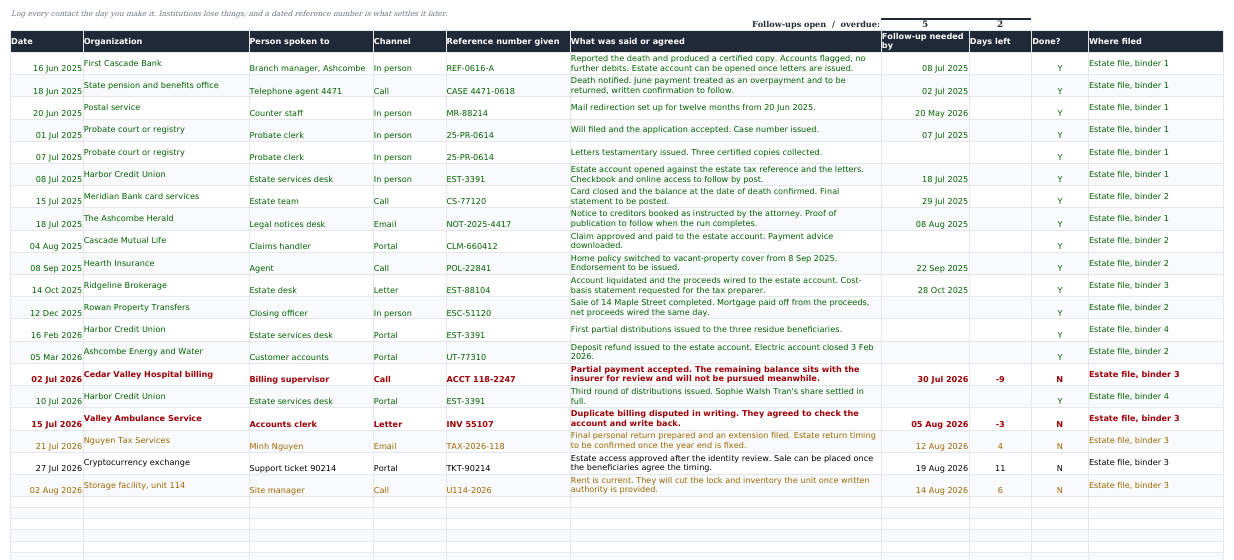
11. Communications Log
200 rows: the date, who you spoke to, the channel, the reference number they gave you and what was agreed. Set a follow-up date and the row counts down. The dashboard shows how many follow-ups have gone past due.
12. Tasks & Contacts
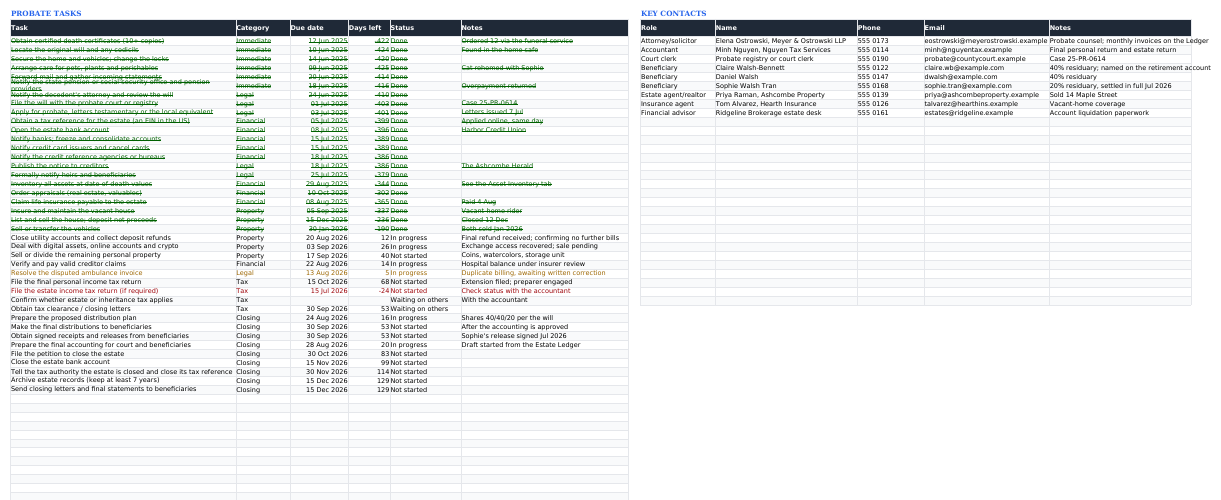
40 probate tasks already written out in the order they usually happen, with a days-left countdown: red overdue, amber due this week, struck through when done. Room for 60 tasks and 30 contacts.
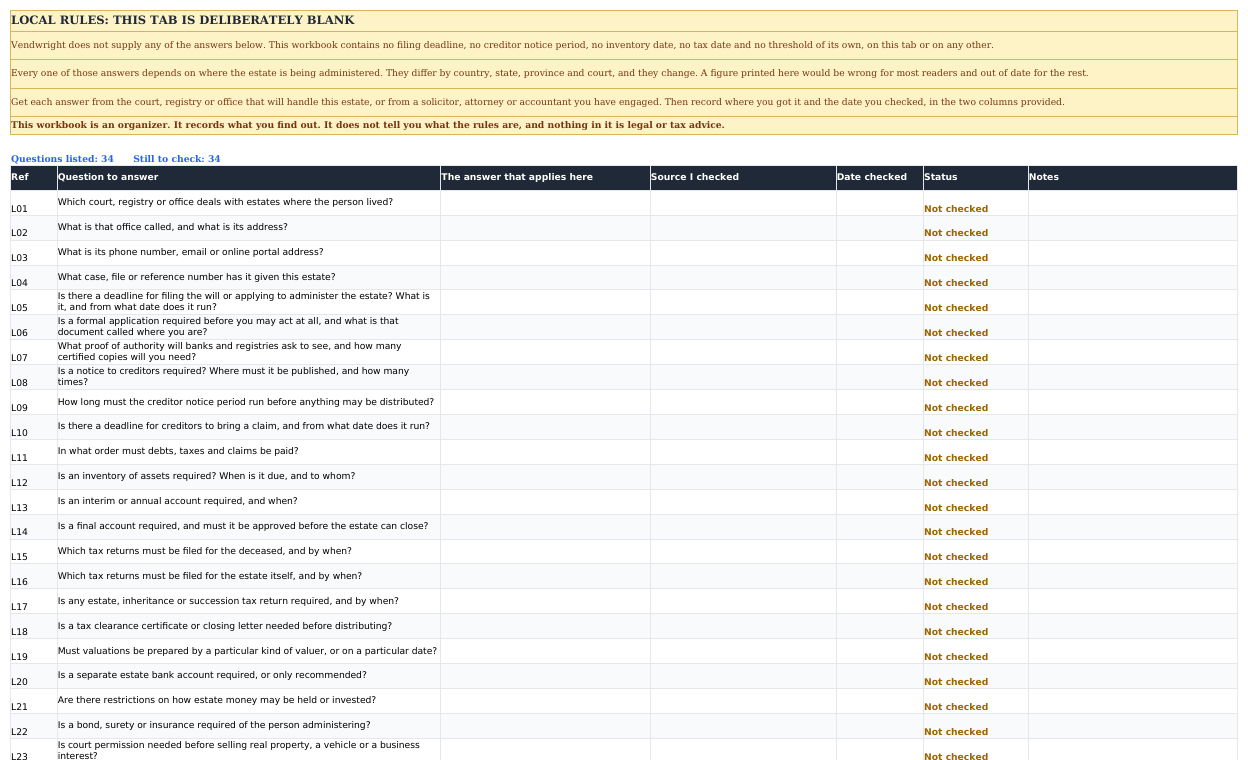
13. Local Rules to Check
34 questions and not one answer. Which office deals with the estate, whether a creditor notice is required and for how long, what order debts are paid in, which returns are due and when. You record the answer, the source and the date you checked. The deadlines that apply to you come from your court or your adviser, not from a spreadsheet.
14. Dashboard
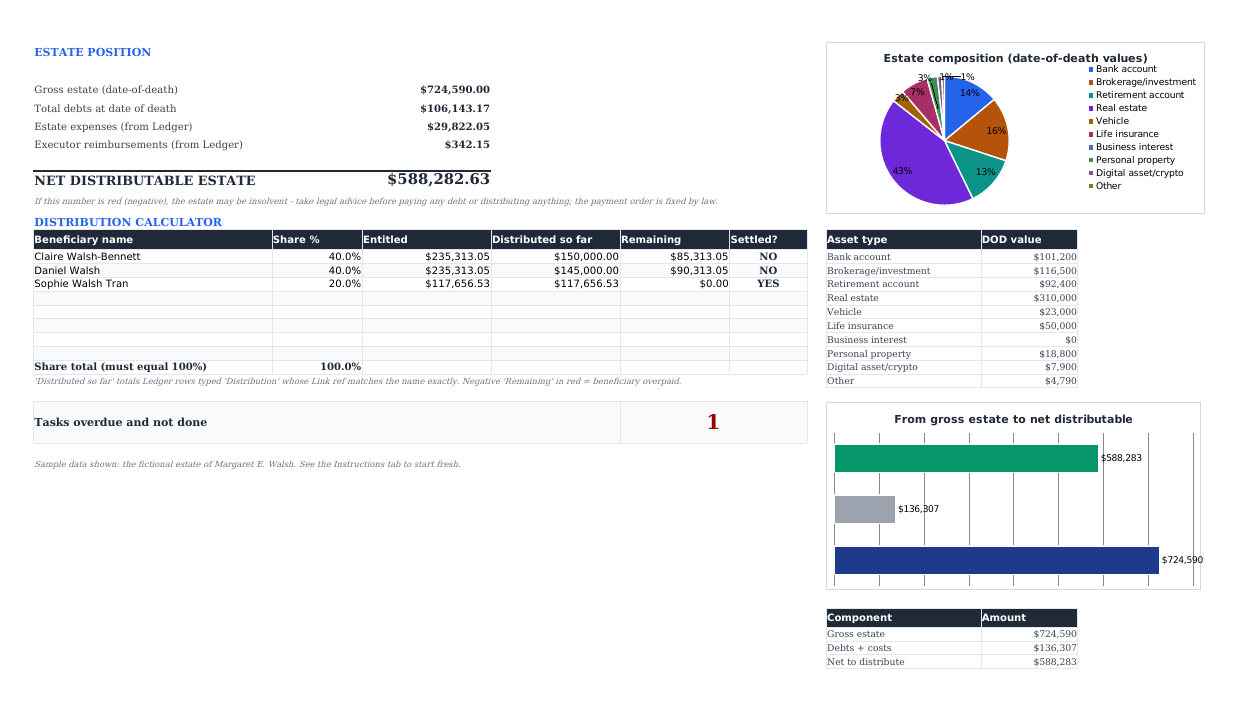
Gross estate, debts, expenses and reimbursements resolved into one net distributable figure, then the distribution totals, refunds and final bills, the overdue-task count, the overdue-follow-up count, and two charts. Nothing on it is typed.
A look inside
The workbook as it downloads, filled with the sample estate. Every name, institution and figure in it is invented.

Specifications
| Format | One .xlsx workbook, about 124 KB |
|---|---|
| Tabs | Fourteen: Instructions, Asset Inventory, Property & Contents, Debts & Claims, Estate Ledger, Income & Expenses, Executor Time & Expenses, Distributions, Accounts & Services, Where Things Are, Communications Log, Tasks & Contacts, Local Rules to Check, Dashboard |
| Capacity | 150 asset rows, 10 property rows with a 50-row contents schedule, 100 debt rows, 300 ledger rows, 150 income and expense rows, 100 executor expense rows, 50 distribution rows, 100 accounts rows, 100 document rows, 200 communication rows, 60 task rows, 30 contacts |
| Works in | Excel 2016 and later, Microsoft 365, Google Sheets, LibreOffice Calc |
| Macros | None. Nothing to enable, nothing to trust |
| Formulas | SUM, SUMIF, SUMIFS, COUNTIFS, VLOOKUP, ROUND, TODAY, all plain and readable |
| Charts | Two: estate composition, and gross estate to net distributable |
| Currency | Pick one from a dropdown on the Instructions tab (EUR, GBP, USD, CAD, AUD, CHF, SEK, NOK, DKK, PLN, NZD) or type your own symbol. Every money heading follows it; the amounts stay plain numbers |
| Sample data | A fictional estate, with cell-by-cell clearing instructions |
| Language | English |
| Delivery | Not on sale yet. When checkout opens: instant download after payment |
| Price | €12 one-off. No subscription and no renewal |
Honest limits
- The structure is jurisdiction-neutral, and so is the currency, but the sample estate is American, so a few task names mention an EIN, the IRS and Social Security. They are ordinary text you type over.
- It does no tax calculation of any kind.
- The prefilled task dates are examples. Real deadlines come from your court, registry or tax authority.
- Local Rules to Check ships with 34 questions and no answers. That is the design, not an omission: we will not print a filing deadline that is wrong for most readers.
- Charts and colour rules survive the Google Sheets import, but give them a glance afterwards.
- It is a spreadsheet, not software. No reminders, no multi-user sync, no audit trail beyond what you type.
- No reviews yet. The product is new, and the screenshots above are the whole pitch.
Questions
Is this legal advice?
No, and it cannot be. It is an organiser: it records what you enter and adds it up. Probate rules differ by country and by US state: who must be notified, in what order debts are paid, what the court wants to see. Confirm all of that with the court, registry or lawyer handling the estate.
Does it really work in Google Sheets?
Yes. File → Import → Upload, then Replace spreadsheet. Formulas, dropdowns and charts come across. Check the conditional-formatting colours afterwards, because Sheets occasionally reinterprets a rule. LibreOffice Calc opens it directly.
Are there macros?
None. It is a plain .xlsx built from SUM, SUMIF, SUMIFS, COUNTIFS, VLOOKUP, ROUND and TODAY. Nothing to enable, and no security prompt to click past.
The sample is in dollars and I am not in the US.
The Instructions tab has a currency dropdown: EUR, GBP, USD, CAD, AUD, CHF, SEK, NOK, DKK, PLN, NZD, or type any symbol you like into the custom cell. Every money heading in the workbook rewrites itself. The amounts stay plain numbers, so a symbol never goes stale in a cell you have already filled in. The structure is jurisdiction-neutral; only the sample estate and a few task names are American.
Can I use it outside the United States, for a UK, Irish, Canadian or Australian estate?
Yes, and nothing about the file has to change except a dozen words. What it tracks is the same in every jurisdiction: what the estate owns, what it owes, what moves through the account, who receives what, and what you were told along the way. A ledger with a running balance is exactly what the estate accounts you hand to the beneficiaries are built from. The task list uses American terms in places (EIN, IRS, letters testamentary); type over those rows with grant of probate and HMRC, or confirmation and Revenue, or whatever your own registry and tax authority are called. Nothing in the file depends on the wording, the currency is a dropdown, and Local Rules to Check is where your local answers go.
Does it arrive full of sample data?
Yes, on purpose: 22 assets, 9 debts, 58 ledger entries, 6 beneficiary entitlements, 24 accounts to close and 20 logged phone calls, so every formula, chart and status colour has something to show before you type a word. Clearing it takes about a minute and the Instructions tab lists the ranges. Every name and figure in it is invented. Local Rules to Check is the exception: it ships blank and stays blank.
Can I use it before anyone has died?
Yes, and it is half the reason it exists. Fill in the asset inventory and the contacts, leave the date-of-death and status columns empty, and put it somewhere your executor will find it. Look at it once a year.
Will it work out the inheritance tax?
No, none at all. What it gives whoever prepares the return is a clean set of date-of-death values, a debts register and a full record of money in and out.
Can my co-executor use the same file?
Yes. It is one file for one estate, so use it with the people working on that estate with you. Please do not resell or redistribute it.
What if it will not open, or a formula looks wrong?
Email support@vendwright.com and say which tab and which cell. Refund terms are on the refunds page.
Get the workbook
€12, one file, instant download once checkout opens. Fourteen tabs that already know how to talk to each other, and a sample estate showing you how.
€12 one-off · .xlsx · no macros
An organisational tool, not legal advice. Probate rules vary by state and country.