Spreadsheet template for the UK
MTD sole trader bookkeeping
A bookkeeping workbook built around Making Tax Digital for Income Tax. Every expense category carries its HMRC self-employment category and SA103F box number. Every entry takes its MTD quarter from its date. The four cumulative update cards sit in fixed cells, ready for whichever bridging software you file with to link to.
United Kingdom only, and pounds sterling only
This is the one file in the shop that is tied to one country, and it is tied hard. It is in pounds with no currency option. The expense categories are HMRC’s own self-employment list, the quarters run on the 6 April UK tax year, the box numbers are SA103F box numbers, and the tax estimate uses England and Northern Ireland rates. If you do not file with HMRC, this workbook is no use to you, and we would rather say that here than take your money. The other templates are the ones that work anywhere.
€11 one-off · 2026/27 edition · not on sale yet
Read this before you buy
This is a spreadsheet, not filing software. No spreadsheet is HMRC-recognised software and none can submit an MTD update by itself, including this one. HMRC does allow spreadsheets as your digital records when they are digitally linked to bridging software that does the submitting. Digital link means a linked cell or a file import; copy-and-paste and retyping do not qualify, so pick a bridging tool that reads this workbook directly. This file is the records half of that pair; you supply the bridging tool, bought separately. If you were expecting something that files for you, buy an all-in-one package instead.
Read the free explanation of how spreadsheets and bridging software fit together →
What it does
Four things an ordinary income-and-expenses sheet does not do.
Categories that speak HMRC’s language
Twelve allowable expense categories, each mapped to one of HMRC's own and labelled with its SA103F box number: Box 17 for goods bought for resale, Box 18 for CIS payments to subcontractors, Box 19 for wages, Box 20 for car and van. Pick from the dropdown and the box number fills itself in. The Instructions tab says in plain English what belongs in each, including the awkward ones: interest but not capital repayments, repairs but not improvements, CIS labour but not wages, parking but never fines. (SA103S, the short form used under £90,000 turnover, numbers the same categories 11 to 19.)
Quarters assigned from the date
Type a date and the quarter appears: 6 Apr to 5 Jul is Q1, and on round to 5 April. Anything dated outside the tax year turns red instead of being quietly absorbed, which catches the classic error, an invoice dated 2 April that belongs to last year sitting in this year’s Q1. The tax year anchor is one Settings cell, so nothing is hard-coded to calendar months. Updates are cumulative from 6 April, and the quarter cards do that arithmetic for you.
Quarterly figures, ready to file
Four cards, one per update: total income, allowable expenses by category with the SA103F box beside each, and profit. The cumulative year-to-date column leads, because that is what an MTD update asks for, with the three-month movement next to it for your own reconciliation. Every figure sits in its own cell so bridging software can point at the range.
A tax estimate you can plan around
The Dashboard estimates 2026/27 Income Tax and Class 4 National Insurance as you type, personal allowance taper above £100,000 included, then turns it into a “you should have set aside” figure at a percentage you choose. It also counts the days to each of the four deadlines.
What it looks like
The actual file with its sample year loaded. Nothing here is mocked up.
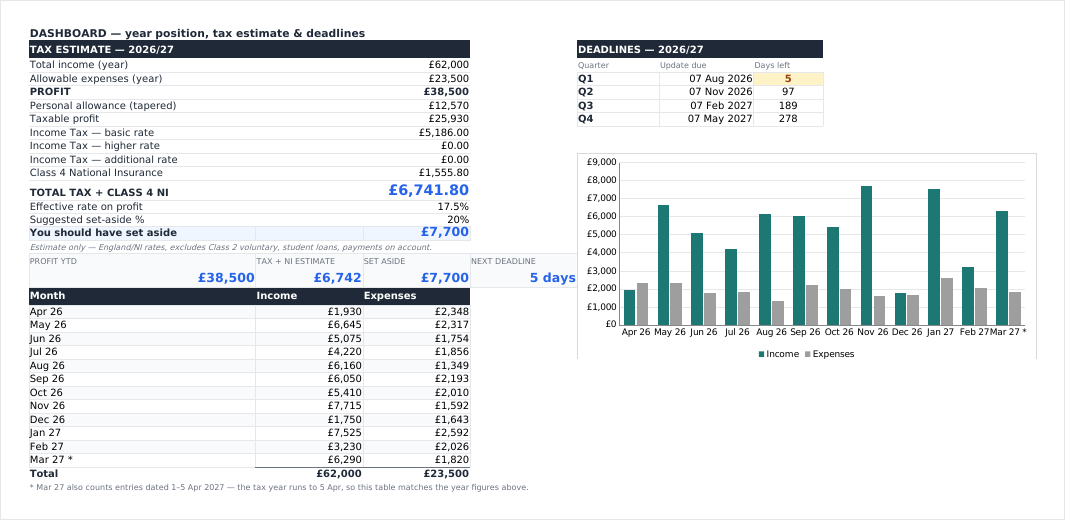
Dashboard
Live tax and Class 4 NI estimate, set-aside gauge, the four deadline countdowns, a monthly income-versus-expenses chart and an expense-split chart.
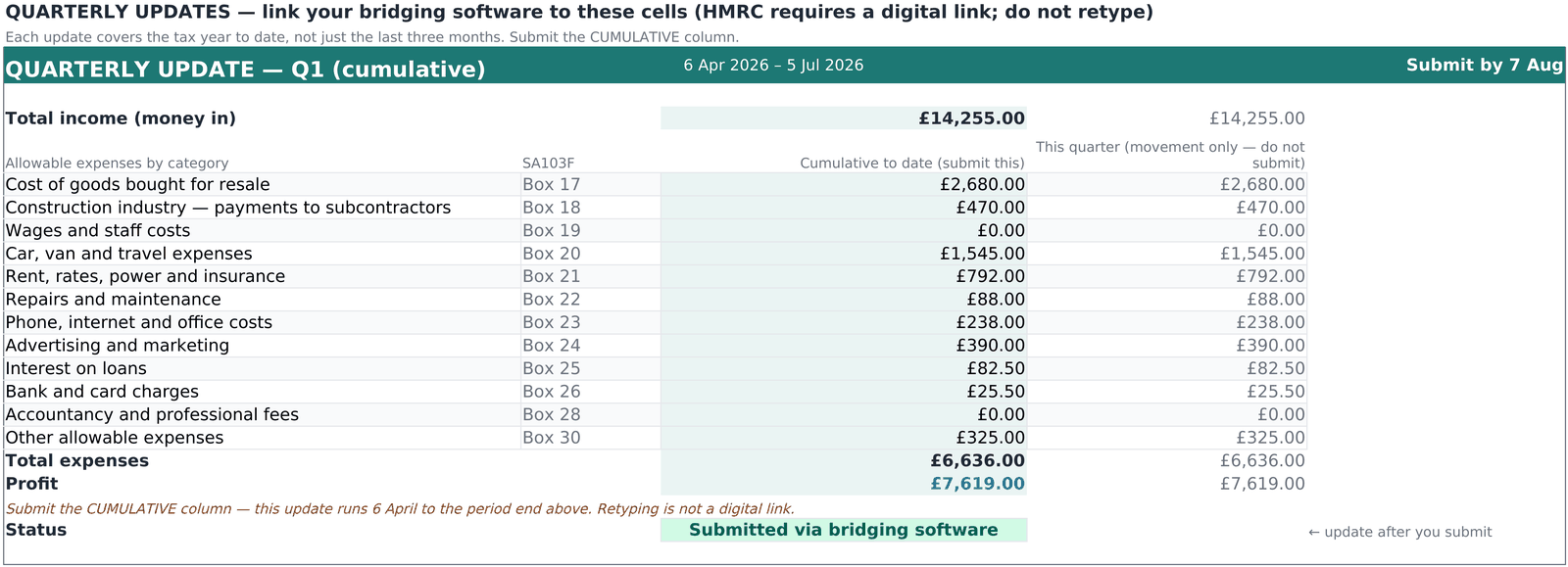
Quarterly Updates
One card per update. Income, expenses by SA103F box and profit, led by the cumulative year-to-date column an MTD update actually asks for.
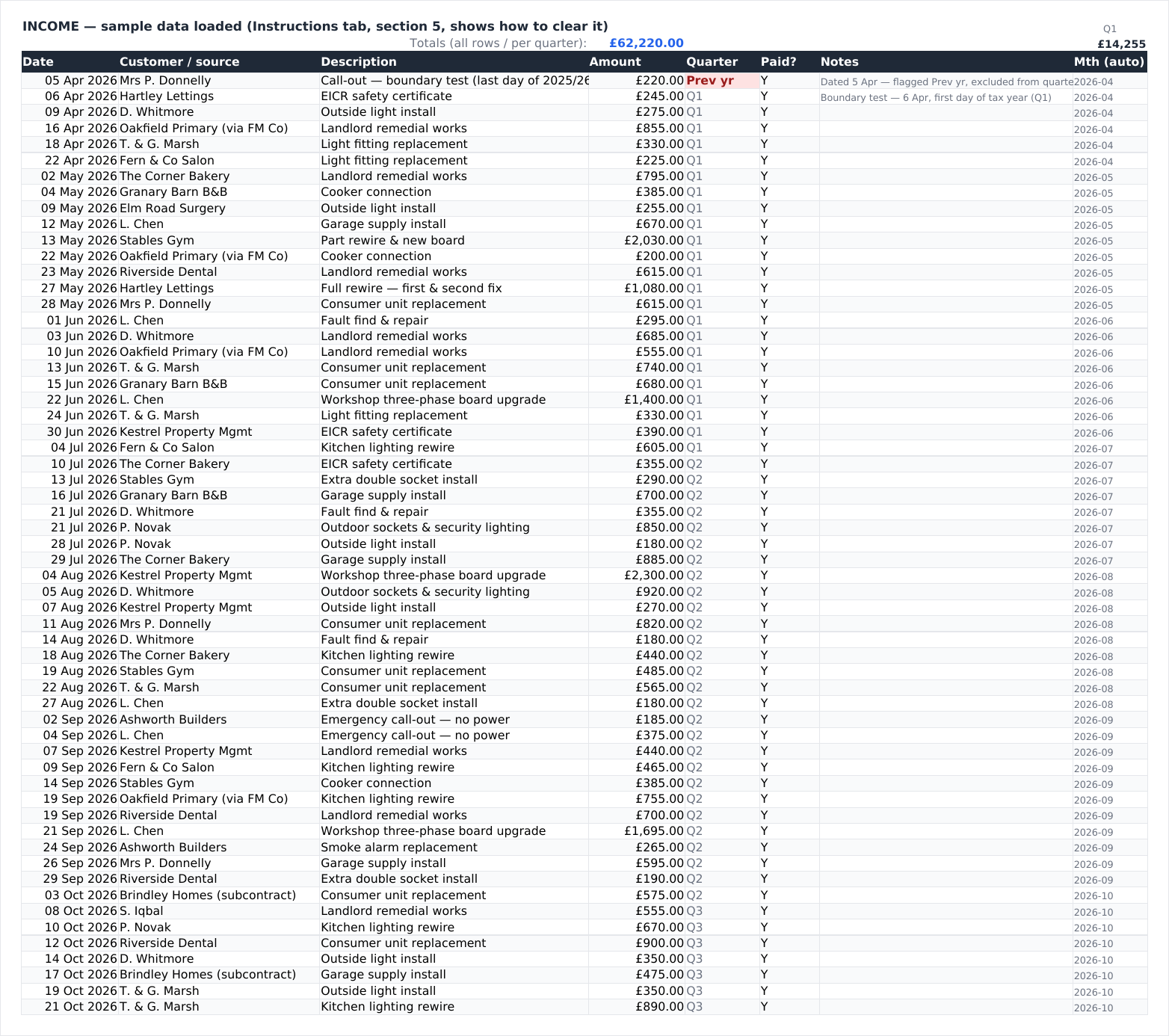
Income
500 rows. Quarter assigned automatically, a red flag when a date falls outside the tax year, amber when an invoice is still unpaid.
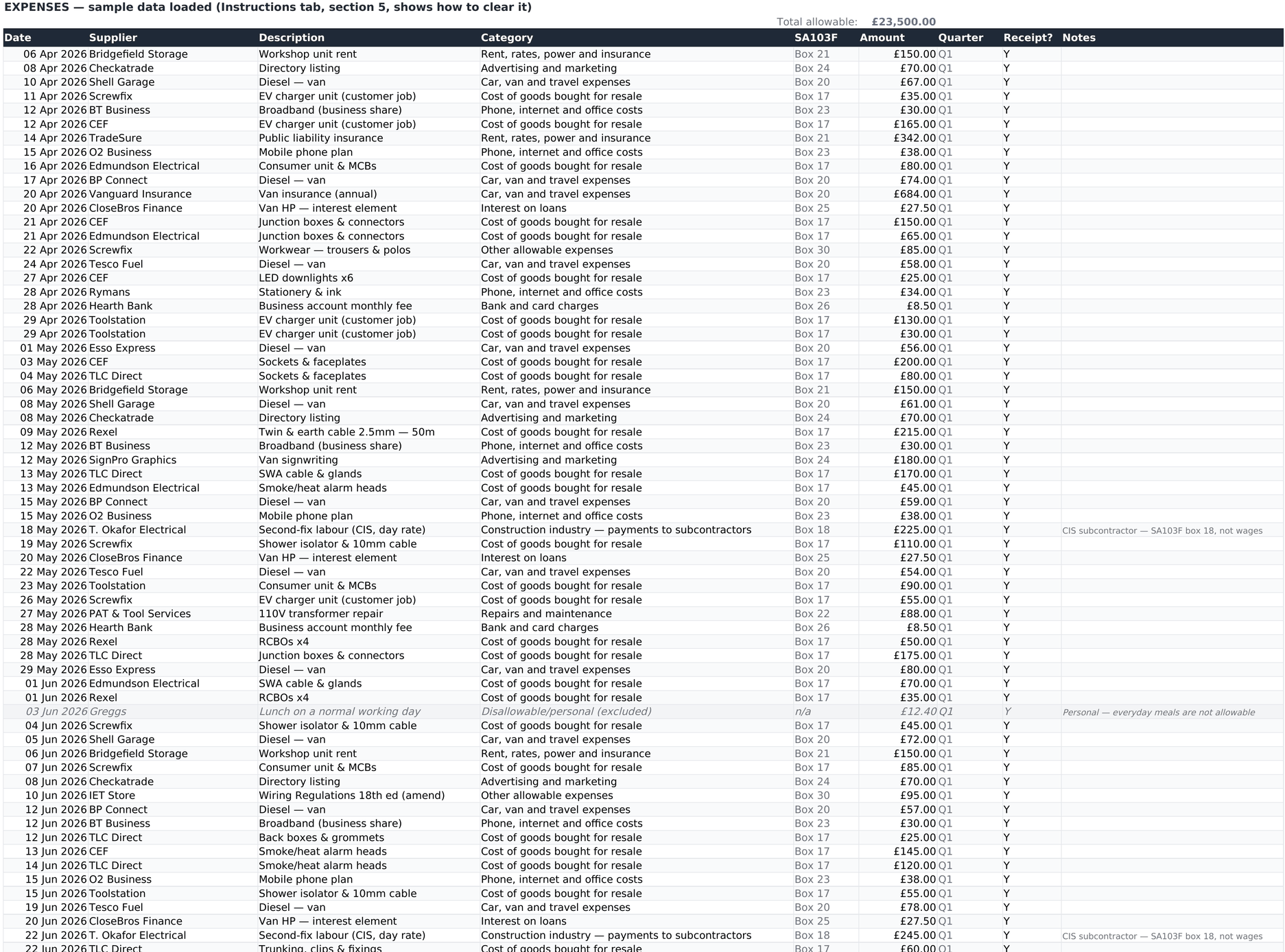
Expenses
1,000 rows. Category dropdown, automatic SA103F box, duplicate detection, receipt tracker, and a disallowable row type that is logged but excluded from every total.
What’s inside, tab by tab
Six tabs. You will live in two of them.
| Tab | What it holds |
|---|---|
| Instructions | A five-step quick start, the category guide in plain English, the deadlines, and how to clear the sample data. Written to be read once. |
| Settings | Your business name, the tax year anchor date (6 Apr 2026), the cash-basis or traditional accounting switch, the twelve-category SA103F table and the 2026/27 tax constants. Only the yellow cells are meant to be edited. |
| Income | Sales register, 500 rows: date, customer or source, description, amount, auto quarter, paid flag, notes and an automatic month column for the chart. |
| Expenses | Expense register, 1,000 rows: date, supplier, description, category dropdown, auto SA103F box, amount, auto quarter, receipt-kept flag and notes. Duplicate entries are highlighted; disallowable and personal items are logged but excluded from every total. |
| Quarterly Updates | Four cards, one per update, showing the cumulative period (6 April to the period end), the submission deadline, income, expenses by category and SA103F box, and profit, cumulative first with the three-month movement beside it. |
| Dashboard | Year position, the 2026/27 Income Tax and Class 4 NI estimate with personal allowance taper, effective rate, the set-aside gauge, the four deadline countdowns, a month-by-month income and expenses table, and two charts. |
The sample year
The file arrives with a full fictional year in it: a jobbing electrician turning over £62,000 with £23,500 of allowable expenses. It is there so you can watch every formula work on somebody else’s money first, awkward rows included. There is an invoice dated 5 April that belongs to the previous tax year, a duplicate supplier entry, and a personal lunch marked disallowable, so you can see each flag fire. Section 5 of the Instructions tab says which ranges to delete. Under a minute.
Questions
Including the ones better asked before buying than after.
Can this spreadsheet submit my MTD quarterly updates?
No, and nothing built in Excel or Google Sheets can. HMRC only accepts submissions from recognised software connected to its API. This workbook produces the figures and bridging software sends them, which is a route HMRC explicitly allows and what the Quarterly Updates tab is laid out for.
Then what do I still need to buy?
One bridging tool, bought separately. Some are free; paid ones are typically £12 to £40 a year rather than a monthly fee. We do not resell it, bundle it or take a commission. Check the current recognised list on GOV.UK and pick one that reads spreadsheets.
Should I retype the quarterly figures into the bridging software?
Preferably not. HMRC’s rules ask for a digital link between your records and the software that files them: linked cells, a CSV or XML export, an emailed workbook or an API transfer. Manual retyping is not a digital link. Every figure on the Quarterly Updates tab sits in its own cell precisely so your bridging tool can point at the range instead. The layout is also readable on screen and on paper, which is useful for checking, but the link is what should carry the numbers.
Does it work in Google Sheets?
Yes. Upload the .xlsx to Google Drive and open it with Sheets. No macros, no add-ins, nothing lost in translation, and the same goes for LibreOffice Calc. Charts and colour rules can render slightly differently between applications. The formulas do not.
Is the tax estimate the same as my tax bill?
No, and it is labelled as an estimate on the Dashboard. It covers Income Tax at England and Northern Ireland rates plus Class 4 National Insurance on the profit recorded in the file. It does not know about employment income, dividends, student loan repayments, payments on account, voluntary Class 2, capital allowances, Scottish or Welsh rates, or anything else on your return. Treat it as a set-aside guide, not a calculation of what you owe.
What if my qualifying income is under £50,000?
Then MTD probably does not apply to you yet. But check what counts first, because qualifying income is your total gross self-employment and property income added together, before expenses, so £27,000 of trade plus £25,000 of rent is £52,000 and in scope. The £30,000 threshold follows in April 2027 and £20,000 in April 2028. The file works perfectly well as ordinary Self Assessment bookkeeping in the meantime, which is rather the point of getting the categories right early. Our free MTD checker will tell you which wave you are in.
Will it still work next tax year?
The bookkeeping will. The rates, thresholds and deadline dates are specific to 2026/27, and a new edition is published for each tax year. This is the 2026/27 edition and does not include future ones. The tax constants sit in labelled Settings cells, so a confident user can update them by hand.
Are there reviews I can read?
Not yet. It is a new product and we are not going to invent any. If you buy it and it does not do what this page says, email support@vendwright.com and we will refund you.
How is it delivered?
Not on sale yet. When checkout opens: instant download after payment. One .xlsx file, about 115 KB. No account to create, no subscription, nothing to install.
What is the licence?
Use it for your own business or businesses, on as many of your own devices as you like. Do not resell it, redistribute it or publish it as your own template. Accountants and bookkeepers wanting to run it across a client base should get in touch first.
Compliance notes
This is a record-keeping ledger, not filing software. It is not MTD-compatible software and it cannot send anything to HMRC. Filing quarterly updates and your final return requires HMRC-recognised compatible or bridging software, bought separately and not included.
Digital link. HMRC requires a digital link between your digital records and your bridging software. Once a figure has been entered as a digital record, moving it must happen digitally, by a linked cell or by a file import. Copy-and-paste and manual re-typing are not digital links. Choose bridging software that reads this workbook directly.
Cumulative updates. MTD quarterly updates are cumulative. Each one covers 6 April to the end of that update period, not the previous three months. Submit the cumulative figures.
Qualifying income. Your total gross income from self-employment and property combined, before expenses, tested against the tax return two years before your start date. It excludes employment (PAYE), partnership profit share, dividends and pensions. Check your own position with HMRC.
Software list and pricing. HMRC publishes the list of recognised products on GOV.UK (search: find software that works with Making Tax Digital for Income Tax) and does not recommend any provider. We are not affiliated with any bridging provider. Bridging prices are set by third parties and change. Some are free; paid ones are typically £12 to £40 a year.
Box numbers. The box numbers shown are SA103F (full). SA103S (short), used where turnover is under £90,000, numbers the same categories 11 to 19. Box numbers are as published by HMRC for the most recent form and may be renumbered in a future year, so check the current form before filing.
Consolidated reporting. Below the £90,000 VAT registration threshold you may report total income and total expenses in your quarterly updates rather than the category split. Above it you must submit cumulative categorised figures.
CIS. If you pay subcontractors in the construction industry, those payments belong in their own category (SA103F box 18), separate from wages.
Not tax advice. The tax figure is an estimate using England and Northern Ireland rates for 2026/27 (Scottish bands differ), assumes the cash basis, and excludes voluntary Class 2 NI, student loan repayments and payments on account. Vendwright is not an accountant.
MTD sole trader bookkeeping
HMRC expense categories with SA103F box numbers, automatic MTD quarters, four cumulative update cards and a live 2026/27 tax estimate. A single spreadsheet file, no macros, instant download once checkout opens.
€11 one-off
Checkout opens shortlyEmail support@vendwright.com to be told when this template goes on sale.
Still working out whether MTD applies to you at all? Try the free Making Tax Digital spreadsheet checker first. It asks for no email address.